
One derivatives connection. Two contract categories.
The combined Bybit connection loads linear and inverse derivatives under the same API key. This includes USDT- and USDC-settled contracts and coin-settled inverse contracts. You do not need to add a duplicate derivatives key solely to switch between BTCUSDT and BTCUSD.
Combined inverse trading requires a verified Bybit UTA 2.0 account. Existing legacy inverse connections remain available for their original workflow. Spot uses a separate connection in Schizo.
| Area | What to expect |
|---|---|
| Linear derivatives | USDT and USDC perpetuals and expiry futures available to the connected account. |
| Inverse derivatives | Coin-settled contracts, including BTCUSD, with the UTA 2.0 requirement. |
| Environment | Live and Demo credentials belong to different environments. Choose the matching form. |
| Order handling | Contract rules, minimum size, permissions and account mode determine which instructions the exchange accepts. |
| History | Available positions, orders and close records follow exchange API coverage and retention; no lifetime-history guarantee. |
Keep the market beside the order.
Arrange charts, the order book and the Place Order module around the same account. A split-chart layout can keep BTCUSDT and BTCUSD visible at once. Select a pane to make its account and instrument the active trading context, then check the order module’s labels and units.
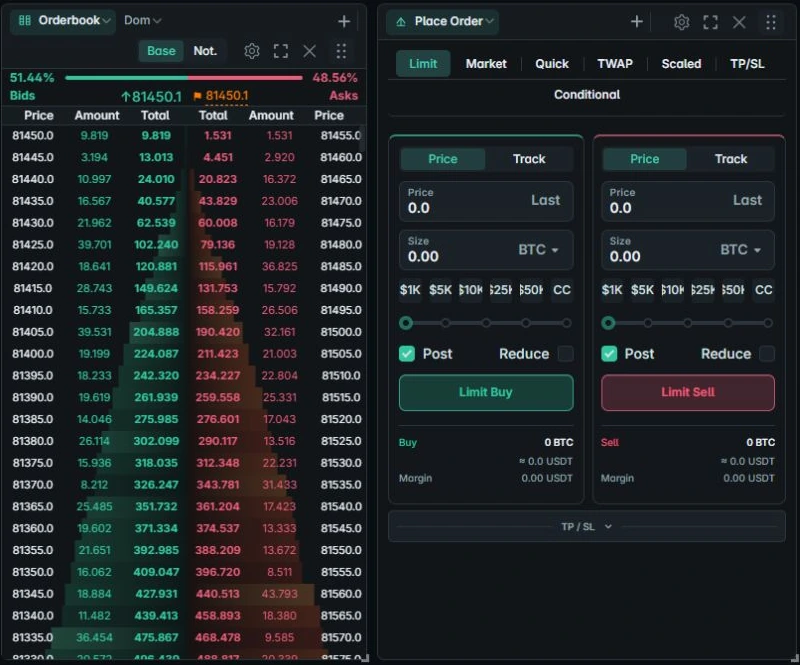
Contract quantities are not interchangeable. Read BTCUSD versus BTCUSDT for the difference between coin quantity, contract quantity and settlement.
Connect and check private access.
- Create a system-generated Bybit key with the required read and trading permissions.
- Open the account manager, choose Bybit and select the matching environment and market connection.
- Name the connection, enter the key and secret, and save it on your device.
- Select the saved account and confirm private balances, positions or orders load.
- Check the intended contract and quantity unit in the order module.
The Bybit setup guide covers the details. A working public chart does not prove that the private API key is valid. Account-mode, clock, IP and permission issues can reject private requests.